One misplaced use client can make Next.js heavier
Technical Insight

Understand Server and Client Component boundaries in Next.js to reduce browser JavaScript without losing interactivity.
One misplaced "use client" directive can turn Next.js's biggest advantage into a heavier React SPA.
That does not make "use client" bad. The issue is treating it as a quick fix whenever a component needs state, an event handler, or a browser API. Put it in page.tsx, layout.tsx, or an overly broad parent component, and the client boundary grows further than necessary.
In the App Router, components are Server Components by default. They can fetch data on the server and use server-only dependencies without sending that code to the browser. When a file has "use client", that file and the dependencies it imports become part of the client-side graph.
The familiar mistake: making the whole page a Client Component
Imagine a product page with a title, product data, long-form content, and search filters. Because the filter needs useState, the easiest move appears to be making the entire page a Client Component.
// products-page.tsx
"use client";

export default function ProductsPage() {
  const [query, setQuery] = useState("");

  return (
    <>
      <SearchFilters query={query} onQueryChange={setQuery} />
      <ProductGrid query={query} />
    </>
  );
}
It works, but the page is now a client boundary. Layout, content, formatters, and the product grid can be pulled toward the browser more than the experience actually requires.
A better pattern: create a small interactive island
Keep the page and data on the server. Extract only the part that truly needs the browser into a Client Component. The filter stays interactive in the browser, while the product grid, data, and remaining content can render on the server.
// products-page.tsx
export default async function ProductsPage({ searchParams }) {
  const products = await getProducts(searchParams.query);

  return (
    <>
      <SearchFilters />
      <ProductGrid products={products} />
    </>
  );
}
// search-filters.tsx
"use client";
export function SearchFilters() {
// state, event handlers and URL interaction live here
}
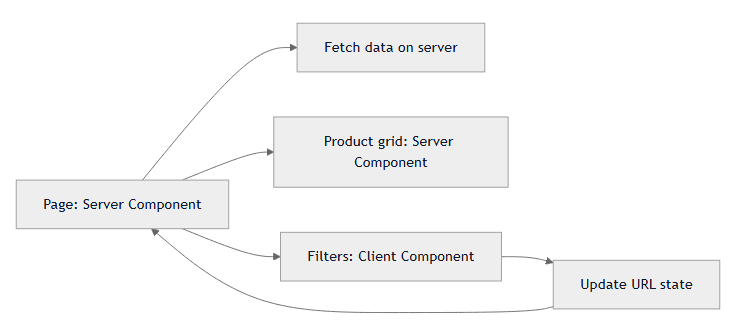
When do you actually need use client?
- You need useState, useEffect, onClick, onChange, or browser APIs such as window and localStorage.
- You need database access, secrets, file reads, static content, or heavy dependencies: keep it in a Server Component.
- A small form, modal, dropdown, or date picker: use a small Client Component instead of turning the whole page into one.
Use client does not mark an interactive component. It marks the boundary where the browser must participate.
Do not turn it into a rigid rule
Real-time dashboards, rich-text editors, drag-and-drop boards, and internal tools with complex client state will need more Client Components. The goal is not to push everything to the server. The goal is to keep browser JavaScript where it creates value.
Conclusion
Next.js is not powerful because everything becomes fast automatically. It is powerful when a team knows what belongs on the server, what belongs in the browser, and does not let one interactive button pull an entire page into the client graph. Before adding use client, ask: does this code truly need to run in the browser, or is it simply near code that does?
Frequently asked questions
Does use client turn an entire application into a Client Component?
No. It defines a boundary at the marked file and its imported dependencies. However, placing that boundary too high in the tree can move more code into the browser than necessary.
Do Server Components replace Client Components entirely?
No. Server Components do not handle state, event handlers, or browser APIs. Client Components remain the right place for genuine interactivity.